Permission Design: Why When You Ask Matters More Than How

Published:

Reading time:

9 min read
Category:
Strategy
Dark blue background with a chain-wrapped smartphone and app permission notification overlays

Most permission requests are denied for a reason that has nothing to do with privacy concerns. They are denied because they arrive before the user has any way to evaluate whether granting is worth it.

An app that requests location, camera, contacts, and notification access on first launch is asking a stranger to trust it with four things before demonstrating value on any of them. The rational response is to deny all four. Nielsen Norman Group's research on permission requests identifies three factors that determine whether a request succeeds: content, timing, and the ability to reverse the decision. Of the three, timing is the one most products get wrong, and it is also the cheapest to fix.

This post covers the permission design rules that follow from that research, and what they mean for conversion and retention in practice. The broader onboarding context is covered in the 10 mobile app onboarding patterns guide, where progressive permissions appear as one pattern among ten; this post is the deep dive on that pattern.

Context-Related vs System-Initiated Requests

NN/g draws a distinction that resolves most permission design decisions on its own. A context-related request is triggered by something the user just did: they tapped the camera icon, so the camera permission dialog appears. A system-initiated request appears at a predetermined moment the user did not choose, most commonly app launch.

Context-related requests are far less likely to cause surprise, because the reason is self-evident from the action that preceded them. The user tapped a scan button and is being asked for camera access; the connection requires no explanation. System-initiated requests carry no such context, which means they need to supply their own justification, and most do not.

This is why the ask-everything-upfront approach is structurally flawed rather than merely suboptimal. It converts every permission into a system-initiated request at the exact moment the user has the least information about the product.

The Content Formula: State the Benefit, Not the Access

Timing determines whether the request makes sense. Content determines whether the user says yes.

NN/g's research tested different reasons for requesting contacts access in a party-planning app. The most compelling reason, framed around what the user could accomplish, produced an 81 percent lift in granted requests compared to the least compelling framing. Same permission, same app, same moment. Only the stated reason changed.

The pattern that works follows a consistent structure: the app would like access to a specific resource so that the user can accomplish a specific task. The failure modes are equally consistent. Requests that state what the app wants rather than what the user gets. Requests that describe the technical capability rather than the outcome. Requests that give no reason at all and rely on the operating system's default text, which is written for legal clarity rather than persuasion.
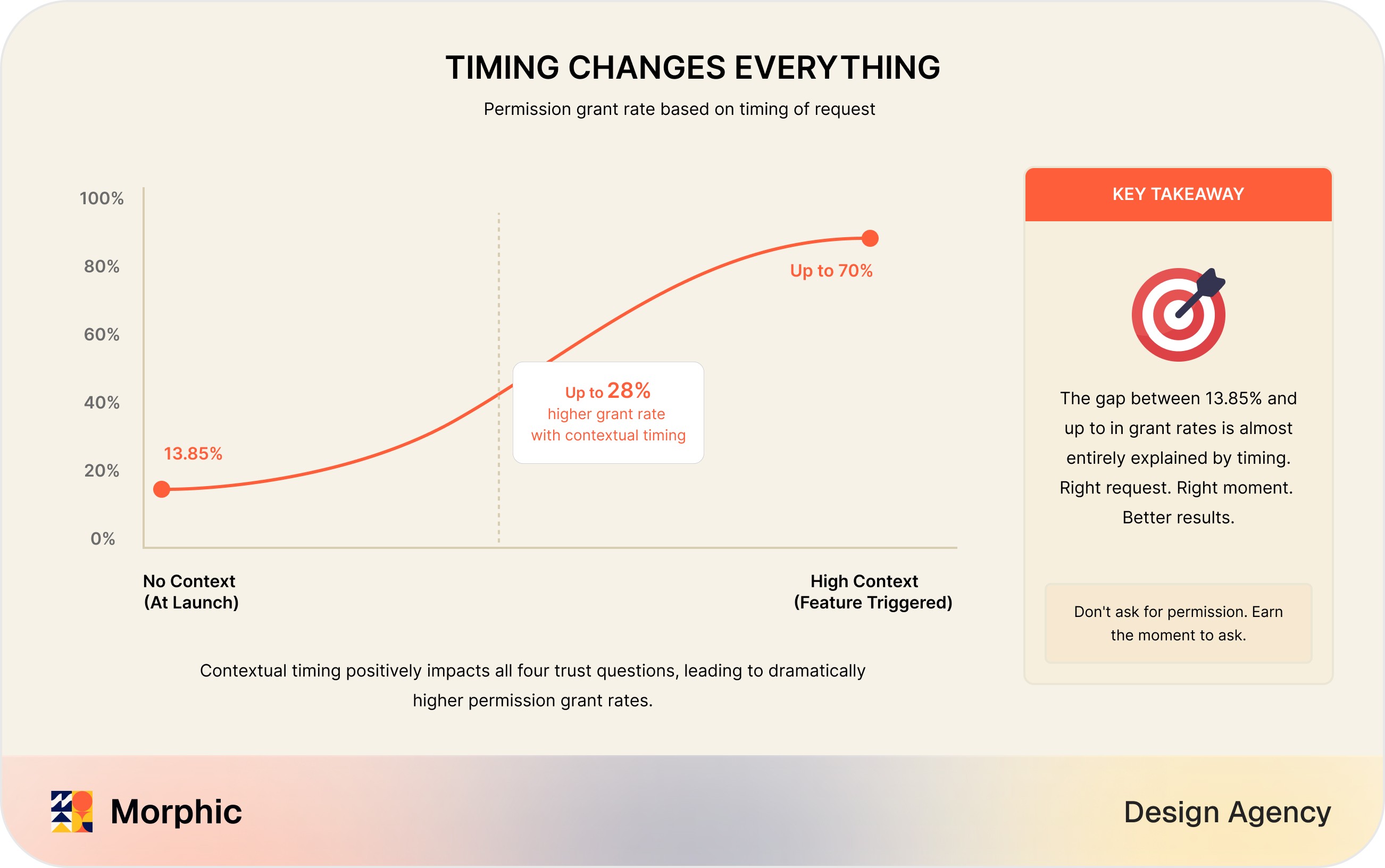
Permission timing grant rate diagram showing permission acceptance over time with a highlighted peak

Permission Priming: The Screen Before the Dialog

There is a structural constraint that makes permission design higher-stakes than most UX decisions: on both major mobile platforms, the operating system's permission dialog can typically only be presented once. If the user denies it, re-requesting requires sending them into device settings, which almost nobody does.

Permission priming solves this. Before triggering the real dialog, the app shows its own custom screen explaining what is being requested and why. If the user indicates willingness, the OS dialog follows. If they decline the priming screen, the OS dialog is never triggered, which means the one-shot opportunity is preserved for a better moment later.

The priming screen is your design surface. Unlike the OS dialog, you control the copy, the visual explanation, and the framing entirely. Using it to make the case, then triggering the system dialog only when the user has already said yes in principle, converts far better than sending the OS dialog in cold.

Permission categories design diagram showing a padlock icon grid with labelled permission types

Decision Reversal: Make Saying Yes Feel Low-Risk

NN/g lists decision reversal alongside content and timing as a core requirement, and it is the one most often omitted entirely. Users who know a permission decision is reversible are more willing to grant it, because the perceived cost of saying yes drops when saying no later is easy.

In practice this means a visible in-app path to permission settings rather than requiring users to navigate device settings to change their mind. It also means the app should handle the denied state gracefully: an app that becomes unusable or nags repeatedly after a denial teaches users that the decision was consequential and irreversible, which makes them more cautious with every subsequent request.

Timing Map: Where Each Permission Belongs

Applying the context-related principle to the common permission types produces a fairly clear map.

Permission

Wrong moment

Right moment

Priming needed?

Camera

App launch, or during signup

User taps a scan, upload, or photo action

Rarely; the action supplies the context

Location

App launch

User opens a map, searches nearby, or requests delivery

Sometimes, if precision or background access is needed

Contacts

Onboarding, before any value

User taps invite, share, or add-collaborator

Yes; the benefit needs stating explicitly

Notifications

App launch, before first value

After the user completes an action that benefits from follow-up

Yes; this is the most-denied permission

Microphone

Onboarding

User taps record, call, or voice input

Rarely; the action supplies the context

Background location / tracking

Anywhere early

Only after sustained value and with a clear stated benefit

Yes, always

Notifications: The Hardest Case

Notification permission deserves separate treatment because it is both the most-requested and the most-denied, and because the cost of a denial is highest. Notifications are the primary re-engagement mechanism for most mobile products, so a denial at first launch removes the main lever for bringing a user back.

The upfront notification request is therefore the single most expensive permission mistake available. It is asked at the moment of lowest trust, for the permission users are most sceptical of, with the highest consequence for denial.

The better sequence: let the user complete an action that would genuinely benefit from a follow-up, then ask, framing the request around that specific benefit. A user who has just set a reminder, joined a conversation, or started a process with a completion event has an obvious reason to want to be told about it. The retention consequences of getting this wrong are covered in SaaS churn and UX.

Permission Interrupts as Conversion Friction

There is a second cost to badly-timed permission requests that has nothing to do with grant rates. A permission dialog that appears during a high-intent task, such as checkout, signup, or first-run setup, adds an unrelated decision to a task the user is trying to complete. This is the same stage-context failure that makes pop-ups and countdown timers destructive during evaluation and checkout, covered in decision-stage friction.

The user in a high-commitment task state has allocated attention to completing that task. An interrupt requiring an unrelated judgement about data access does not just risk a denial, it risks abandonment of the task itself. Permission requests belong at natural boundaries in the experience, not in the middle of a flow the user is trying to finish.

The Bottom Line

Permission design fails on timing far more often than on wording, though wording matters enormously once timing is right. Ask when the user's own action makes the reason self-evident. Prime before triggering the one-shot system dialog. State the benefit to the user rather than the access to the app. Make reversal visible so that saying yes feels low-risk. And never interrupt a high-intent task with a permission decision that could wait for a natural boundary.

Morphic designs onboarding and first-run experiences for consumer apps and SaaS products, including the permission sequencing that determines whether your retention mechanisms are available to you at all, through its app design and user research work. Every plan starts with a free 3-day trial before your first invoice. Book a 30-minute call, or see pricing.

Key Takeaways

Icon

Permission requests are usually denied because they arrive before the user can evaluate whether granting is worth it, not because of privacy concerns.

Icon

NN/g identifies three factors: content, timing, and decision reversal, and timing is the one most products get wrong and the cheapest to fix.

Icon

Wording matters enormously once timing is right: NN/g found an 81 percent lift in grants from the most compelling reason versus the least compelling.

Icon

The OS permission dialog can typically only be shown once, which makes permission priming the highest-leverage technique available.

Icon

Never interrupt a high-intent task with a permission decision, because the risk is abandonment of the task itself rather than merely denial of the permission.

Image
Emon Datta

Founder, Morphic Agency

Morphic Agency is a Melbourne-based UX design agency. We've shipped 50+ products across 15+ countries.

Icon
Icon
Icon
Have a Project in Mind? Let's Chat.
Share
Instagram
Facebook
Twitter
Icon

FAQ

Frequently Asked Questions

When should an app ask for permissions?

At the moment the user takes an action that requires the permission, not at launch. Nielsen Norman Group distinguishes context-related requests, triggered by a user action such as tapping a camera icon, from system-initiated requests that appear at predetermined times. Context-related requests are far less likely to cause surprise, because the reason is self-evident from what the user just did.

How much does the wording of a permission request matter?

Substantially, once timing is right. NN/g research testing different reasons for requesting contacts access in a party-planning app found the most compelling reason produced an 81 percent lift in granted requests compared to the least compelling. The pattern that works states the benefit to the user: the app would like access to your resource so that you can accomplish a specific task.

What is permission priming?

Permission priming is showing a custom in-app explanation before triggering the operating system's permission dialog. It matters because the OS dialog can usually only be shown once; if the user denies it, re-requesting requires sending them into device settings, which almost nobody does. A priming screen lets you make the case first and only trigger the real dialog when the user has indicated willingness, preserving the one-shot opportunity.

Should users be able to change their permission decisions later?

Yes, and the path should be visible in the app rather than requiring users to find it in device settings. NN/g lists decision reversal as one of three core requirements alongside content and timing. Users who know a decision is reversible are more willing to grant it in the first place, because the perceived risk of saying yes is lower.

How does permission design affect conversion and retention?

An upfront permission stack trains users to deny everything before trust exists, which removes the mechanisms, such as notifications and location, that many products depend on for retention. Worse, a permission interrupt during a high-intent moment such as checkout or first-run setup adds an unrelated decision to a task the user is trying to complete, which raises abandonment of the task itself, not just denial of the permission.

Icon

FAQ

Frequently Asked Questions

When should an app ask for permissions?

At the moment the user takes an action that requires the permission, not at launch. Nielsen Norman Group distinguishes context-related requests, triggered by a user action such as tapping a camera icon, from system-initiated requests that appear at predetermined times. Context-related requests are far less likely to cause surprise, because the reason is self-evident from what the user just did.

How much does the wording of a permission request matter?

Substantially, once timing is right. NN/g research testing different reasons for requesting contacts access in a party-planning app found the most compelling reason produced an 81 percent lift in granted requests compared to the least compelling. The pattern that works states the benefit to the user: the app would like access to your resource so that you can accomplish a specific task.

What is permission priming?

Permission priming is showing a custom in-app explanation before triggering the operating system's permission dialog. It matters because the OS dialog can usually only be shown once; if the user denies it, re-requesting requires sending them into device settings, which almost nobody does. A priming screen lets you make the case first and only trigger the real dialog when the user has indicated willingness, preserving the one-shot opportunity.

Should users be able to change their permission decisions later?

Yes, and the path should be visible in the app rather than requiring users to find it in device settings. NN/g lists decision reversal as one of three core requirements alongside content and timing. Users who know a decision is reversible are more willing to grant it in the first place, because the perceived risk of saying yes is lower.

How does permission design affect conversion and retention?

An upfront permission stack trains users to deny everything before trust exists, which removes the mechanisms, such as notifications and location, that many products depend on for retention. Worse, a permission interrupt during a high-intent moment such as checkout or first-run setup adds an unrelated decision to a task the user is trying to complete, which raises abandonment of the task itself, not just denial of the permission.

Icon

FAQ

Frequently Asked Questions

When should an app ask for permissions?

At the moment the user takes an action that requires the permission, not at launch. Nielsen Norman Group distinguishes context-related requests, triggered by a user action such as tapping a camera icon, from system-initiated requests that appear at predetermined times. Context-related requests are far less likely to cause surprise, because the reason is self-evident from what the user just did.

How much does the wording of a permission request matter?

Substantially, once timing is right. NN/g research testing different reasons for requesting contacts access in a party-planning app found the most compelling reason produced an 81 percent lift in granted requests compared to the least compelling. The pattern that works states the benefit to the user: the app would like access to your resource so that you can accomplish a specific task.

What is permission priming?

Permission priming is showing a custom in-app explanation before triggering the operating system's permission dialog. It matters because the OS dialog can usually only be shown once; if the user denies it, re-requesting requires sending them into device settings, which almost nobody does. A priming screen lets you make the case first and only trigger the real dialog when the user has indicated willingness, preserving the one-shot opportunity.

Should users be able to change their permission decisions later?

Yes, and the path should be visible in the app rather than requiring users to find it in device settings. NN/g lists decision reversal as one of three core requirements alongside content and timing. Users who know a decision is reversible are more willing to grant it in the first place, because the perceived risk of saying yes is lower.

How does permission design affect conversion and retention?

An upfront permission stack trains users to deny everything before trust exists, which removes the mechanisms, such as notifications and location, that many products depend on for retention. Worse, a permission interrupt during a high-intent moment such as checkout or first-run setup adds an unrelated decision to a task the user is trying to complete, which raises abandonment of the task itself, not just denial of the permission.

Icon

TESTIMONIALS

Real feedback from founders and product teams we have worked with.

  • I have had the pleasure of working with Morphic for over a year and he has consistently been very creative, kind and attentive person to work with! He is very attentive, intuitive and is truly talented! He is absolutely wonderful!

    Author Image
    Ashley Sabatini

    Founder, Breathwork

  • I have had the pleasure of working with Morphic for over a year and he has consistently been very creative, kind and attentive person to work with! He is very attentive, intuitive and is truly talented! He is absolutely wonderful!

    Tobias F

    Founder & CEO, MingleMinds

  • Working with Emon was amazing. I initially gave him a take home design assignment with clear goals and he was able to understand my vision with no problem. That delivery was on time and we have collaborated on everything from wireframes to the complete UX/UI of my project. I will continue working with him at every chance possible. You should too!

    Author Image
    Tobias F

    Founder, MingleMinds

  • Working with Emon was a great experience. Super clear communication, easy to work with, and he pushed us in the right direction. The designs were creative, practical. The project is now one of our most successful features. 100% recommend.

    Author Image
    Callum Johnstone

    Product Owner, Nursery Story

  • Morphic was fantastic to work with - putting in a lot of effort to make sure he understood the assignment and requirements. He came up with some great designs, absolutely nailing the brief. Look forward to working with him again. Thanks Emon!

    Author Image
    Sam

    Founder, Amigos

  • Top-tier Website designer. Great communication, fast delivery, and excellent usability improvements.

    Author Image
    Eric

    CoFounder, GKM Interactive

  • Emon is a talented and reliable designer with a great eye for detail. He quickly understood the project goals and delivered clean, modern designs that matched our vision. Communication was smooth and professional throughout the process, and he was always open to feedback and ready to adjust things when needed. Highly recommended for anyone looking for high-quality UX/UI work.

    Author Image
    Kaja Rutkowska

    CoFounder, Petifit

  • Emon is an amazing human and wonderful person to work with. His attention to detail and sole focus on each individual project he undertakes makes getting the job done feel like a breeze. I’ve personally worked with Emon on near 50+ projects all of which Emon has shown immense care and dedication to all work. Communication was a 10/10, he always put in overtime in making sure the work and overall goal was clearly stated and achieved. As a person he has an amazing heart and always there to support and help no matter what. He is a good man and a really strong employee that can be counted on!

    Author Image
    Jude Lopez

    Founder, HomeIO

Icon

TESTIMONIALS

Real feedback from founders and product teams we have worked with.

  • I have had the pleasure of working with Morphic for over a year and he has consistently been very creative, kind and attentive person to work with! He is very attentive, intuitive and is truly talented! He is absolutely wonderful!

    Author Image
    Ashley Sabatini

    Founder, Breathwork

  • I have had the pleasure of working with Morphic for over a year and he has consistently been very creative, kind and attentive person to work with! He is very attentive, intuitive and is truly talented! He is absolutely wonderful!

    Tobias F

    Founder & CEO, MingleMinds

  • Working with Emon was amazing. I initially gave him a take home design assignment with clear goals and he was able to understand my vision with no problem. That delivery was on time and we have collaborated on everything from wireframes to the complete UX/UI of my project. I will continue working with him at every chance possible. You should too!

    Author Image
    Tobias F

    Founder, MingleMinds

  • Working with Emon was a great experience. Super clear communication, easy to work with, and he pushed us in the right direction. The designs were creative, practical. The project is now one of our most successful features. 100% recommend.

    Author Image
    Callum Johnstone

    Product Owner, Nursery Story

  • Morphic was fantastic to work with - putting in a lot of effort to make sure he understood the assignment and requirements. He came up with some great designs, absolutely nailing the brief. Look forward to working with him again. Thanks Emon!

    Author Image
    Sam

    Founder, Amigos

  • Top-tier Website designer. Great communication, fast delivery, and excellent usability improvements.

    Author Image
    Eric

    CoFounder, GKM Interactive

  • Emon is a talented and reliable designer with a great eye for detail. He quickly understood the project goals and delivered clean, modern designs that matched our vision. Communication was smooth and professional throughout the process, and he was always open to feedback and ready to adjust things when needed. Highly recommended for anyone looking for high-quality UX/UI work.

    Author Image
    Kaja Rutkowska

    CoFounder, Petifit

  • Emon is an amazing human and wonderful person to work with. His attention to detail and sole focus on each individual project he undertakes makes getting the job done feel like a breeze. I’ve personally worked with Emon on near 50+ projects all of which Emon has shown immense care and dedication to all work. Communication was a 10/10, he always put in overtime in making sure the work and overall goal was clearly stated and achieved. As a person he has an amazing heart and always there to support and help no matter what. He is a good man and a really strong employee that can be counted on!

    Author Image
    Jude Lopez

    Founder, HomeIO

Icon

TESTIMONIALS

Real feedback from founders and product teams we have worked with.

  • I have had the pleasure of working with Morphic for over a year and he has consistently been very creative, kind and attentive person to work with! He is very attentive, intuitive and is truly talented! He is absolutely wonderful!

    Author Image
    Ashley Sabatini

    Founder, Breathwork

  • I have had the pleasure of working with Morphic for over a year and he has consistently been very creative, kind and attentive person to work with! He is very attentive, intuitive and is truly talented! He is absolutely wonderful!

    Tobias F

    Founder & CEO, MingleMinds

  • Working with Emon was amazing. I initially gave him a take home design assignment with clear goals and he was able to understand my vision with no problem. That delivery was on time and we have collaborated on everything from wireframes to the complete UX/UI of my project. I will continue working with him at every chance possible. You should too!

    Author Image
    Tobias F

    Founder, MingleMinds

  • Working with Emon was a great experience. Super clear communication, easy to work with, and he pushed us in the right direction. The designs were creative, practical. The project is now one of our most successful features. 100% recommend.

    Author Image
    Callum Johnstone

    Product Owner, Nursery Story

  • Morphic was fantastic to work with - putting in a lot of effort to make sure he understood the assignment and requirements. He came up with some great designs, absolutely nailing the brief. Look forward to working with him again. Thanks Emon!

    Author Image
    Sam

    Founder, Amigos

  • Top-tier Website designer. Great communication, fast delivery, and excellent usability improvements.

    Author Image
    Eric

    CoFounder, GKM Interactive

  • Emon is a talented and reliable designer with a great eye for detail. He quickly understood the project goals and delivered clean, modern designs that matched our vision. Communication was smooth and professional throughout the process, and he was always open to feedback and ready to adjust things when needed. Highly recommended for anyone looking for high-quality UX/UI work.

    Author Image
    Kaja Rutkowska

    CoFounder, Petifit

  • Emon is an amazing human and wonderful person to work with. His attention to detail and sole focus on each individual project he undertakes makes getting the job done feel like a breeze. I’ve personally worked with Emon on near 50+ projects all of which Emon has shown immense care and dedication to all work. Communication was a 10/10, he always put in overtime in making sure the work and overall goal was clearly stated and achieved. As a person he has an amazing heart and always there to support and help no matter what. He is a good man and a really strong employee that can be counted on!

    Author Image
    Jude Lopez

    Founder, HomeIO